Key takeaways
- Cloud GPU providers let indie developers and creators access powerful graphics processors without buying expensive hardware.
- Mordor Intelligence estimated the global GPU cloud market at $7.73 billion in 2025, reflecting growing demand for remote GPU computing.
- Platforms such as Xesktop, Meshive, Runpod, Vast.ai, TensorDock, Lium, and Thunder Compute offer different ways to rent GPU resources.
- GPU memory, software compatibility, pricing, and ease of setup are important when choosing a provider.
- Cloud GPUs can support ComfyUI, AI video generation, LoRA training, Blender rendering, and personal machine learning projects.
TL;DR
Cloud GPU providers make powerful computing resources accessible to indie developers, freelancers, hobbyists, and AI creators who need more performance than their local computers can provide. Whether you want to generate AI videos, train a custom model, or render a Blender project, renting a GPU can be a practical alternative to purchasing expensive hardware. This guide covers popular cloud GPU providers for independent creators, how their services differ, what affects pricing, and how to choose the right platform for your projects.
What are cloud GPU providers?
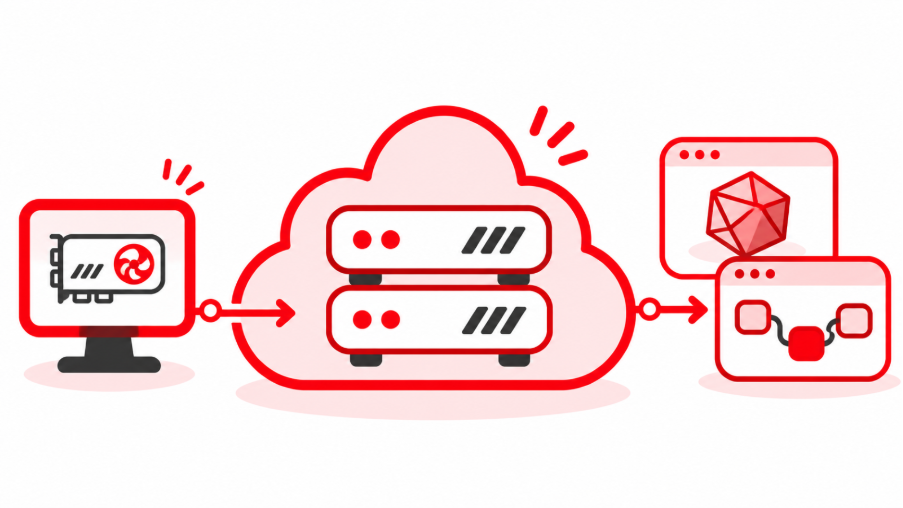
Cloud GPU providers are services that let you rent graphics processing power from remote servers. Instead of purchasing a powerful graphics card and installing it in your computer, you access a GPU hosted in a data center and use it to run demanding applications.
For indie developers and creators, this means you can work on projects that might otherwise be limited by your computer’s hardware. You could run a complex ComfyUI workflow, experiment with a larger AI model, or render a detailed Blender scene without upgrading your entire workstation. Mordor Intelligence estimated the global GPU cloud market at $7.73 billion in 2025; This market estimate reflects the growing commercial interest in renting GPU computing resources, although the market includes enterprise applications as well as smaller creative workloads.
Cloud GPUs vs local GPUs
Both options can handle demanding creative and AI workloads, but their costs and limitations differ.
| Factor | Cloud GPUs | Local GPUs |
| Initial investment | Usually no hardware purchase | Requires compatible hardware |
| GPU upgrades | Choose available hardware remotely | Purchase new components |
| Performance | Depends on rented GPU and environment | Depends on installed hardware |
| Internet connection | Required for remote access | Not required for local processing |
| Maintenance | Infrastructure managed by provider | Hardware maintained by user |
| Long term costs | Usage and storage charges | Hardware and electricity costs |
A local GPU can be more economical if you use it heavily every day. Cloud GPUs are especially useful when you only need additional computing power occasionally or want to experiment with hardware before committing to a purchase.
What can indie developers use cloud GPUs for?
Cloud GPUs are useful across several creative and technical workflows. The hardware requirements vary depending on the application, but the general benefit is access to computing resources beyond what a personal computer can comfortably provide.
AI image and video generation
Tools such as ComfyUI allow creators to build customized workflows for generating images and videos. Depending on the models involved, these workflows can consume substantial GPU memory.
Cloud GPUs can help with:
- Generating images using diffusion models
- Creating AI videos with compatible models
- Running complex ComfyUI node workflows
- Testing different models and generation settings
- Processing larger outputs or batches
Creators can also use remote GPUs to experiment with models that would be difficult to run on their existing hardware.
AI model training and LoRA fine tuning
Indie developers may want to customize AI models for specific characters, visual styles, or applications. LoRA training offers a more resource efficient approach than updating every parameter of a large model, but training still requires compatible hardware and sufficient memory. Cloud GPUs provide temporary access to additional computing resources, making it possible to experiment without building a dedicated training workstation.
Indie game development and personal projects
Cloud GPUs can also support individual developers working on experimental games, graphics applications, and personal software projects. They can be useful for testing demanding workloads, generating assets, or developing applications that require more GPU memory than a local computer can provide.
One example is Arbel, an independent developer who created Ozen, a free application that provides live Hebrew captions for people who are hard of hearing. While developing its speech recognition models, Arbel found that his local RTX 2080 Ti could not handle certain training workloads. By renting GPU resources through Xesktop, he was able to continue developing and training his models without purchasing additional hardware.
“My RTX 2080 Ti’s 11GB of VRAM and clock speed couldn’t handle the training jobs, so without Xesktop that work wouldn’t have happened at all.” – Arbel
His experience demonstrates how cloud GPUs can help solo developers overcome hardware limitations and bring personal projects to life.
Best cloud GPU providers for indie developers and creators
Choosing a cloud GPU provider can feel overwhelming when every platform offers different hardware, pricing, and setup options. For indie developers, the most useful services are usually those that make it easy to rent a GPU for a few hours, run a project, and stop paying when the work is finished.
Here are seven providers worth considering, listed in no particular order, as each offers different advantages depending on your workflow and requirements.
Xesktop
Xesktop provides remote Windows GPU workstations for AI creators, developers, and 3D artists. Users can access NVIDIA RTX PRO 6000 Blackwell GPUs with 96GB of VRAM per GPU, making the platform suitable for memory intensive applications.
ComfyUI comes preinstalled, while full administrator access allows users to install additional models, plugins, and software. Xesktop also offers persistent storage and usage based billing, which can be useful for creators who frequently return to the same projects. For creators who prefer working in a familiar desktop environment rather than configuring cloud infrastructure, Xesktop offers a more straightforward way to access powerful GPU resources.
Best for: Indie creators who want a familiar Windows desktop, powerful GPUs, and an easier way to run ComfyUI or 3D applications.
Meshive
Meshive is a task-first cloud GPU platform designed for AI training, inference, rendering, and other GPU-intensive workloads. It allows developers to rent dedicated NVIDIA GPUs through configurable GPU pods, with access to hardware ranging from consumer RTX graphics cards to high-performance data center GPUs.
Unlike traditional GPU rental services that focus primarily on providing remote hardware, Meshive emphasizes simplifying the process of running workloads. It offers ready-to-use environments for ComfyUI, JupyterLab, and vLLM, along with on-demand and spot GPU rentals billed in one-minute intervals. This makes it useful for developers and creators who want flexible GPU access without managing complex infrastructure.
Best for: Task-based GPU rentals for AI development
Runpod
Runpod is a cloud GPU platform designed for AI development, model training, inference, and other GPU-intensive workloads. It provides on-demand GPU instances called Pods, allowing developers to choose from various NVIDIA GPUs and deploy computing environments suited to their projects.
The platform offers ready-to-use templates for applications such as ComfyUI, along with customizable environments and persistent storage options. Runpod also provides serverless GPU computing, allowing developers to deploy AI models through scalable API endpoints without continuously managing running instances. This makes it useful for developers who need flexible infrastructure for both experimentation and production workloads.
Best for: AI developers and creators who want flexible GPU instances, preconfigured environments, or serverless model deployment.
Vast.ai
Vast.ai operates as a GPU marketplace where independent hosts offer computing resources at different prices. Users can compare available GPUs based on hardware specifications, cost, location, and host reliability.
This marketplace approach can provide affordable options for personal projects. However, selecting a suitable host and managing the environment may require more technical knowledge than using a preconfigured workstation.
Best for: Budget conscious hobbyists and developers who are comfortable configuring their own environments.
TensorDock
TensorDock is a cloud GPU marketplace that connects developers with computing resources from independent hosting providers. It offers a range of NVIDIA GPUs for AI model training, inference, rendering, and other GPU-intensive tasks, with pricing that varies depending on the hardware and host.
One of TensorDock’s distinguishing features is its configurable virtual machines, allowing users to select GPU hardware alongside CPU, RAM, and storage resources based on their requirements. The platform supports Linux and Windows environments and provides access to consumer and data center GPUs. Its marketplace approach can be useful for cost-conscious developers, although available configurations and pricing depend on individual hosts.
Best for: Developers and hobbyists looking for configurable GPU virtual machines and competitive marketplace pricing.
Lium
Lium is a cloud GPU marketplace that allows developers to rent computing resources for AI model training, inference, and other GPU-intensive tasks. One of its distinguishing features is its support for AI coding agents, including Claude Code and Codex, which can provision, manage, and terminate GPU instances through its command-line tools.
The platform also offers agent-specific API keys, spending limits, per-second billing, and automated host reliability checks. This makes Lium particularly useful for developers building automated AI workflows that need flexible GPU access without manually managing every instance.
Best for: AI agent-managed GPU workloads
Thunder Compute
Thunder Compute provides GPU instances for machine learning and development workloads. Its service supports temporary GPU access, allowing users to experiment with models without purchasing dedicated hardware.
The platform is oriented toward developers working with remote computing environments, making it suitable for machine learning experiments and personal AI projects.
Best for: Students, hobbyists, and independent developers experimenting with machine learning.
Cloud GPU provider comparison
| Provider | Main advantage | Best suited for |
| Xesktop | Ready-to-use full Windows GPU desktop with preinstalled ComfyUI and admin access | AI creation, 3D rendering |
| Meshive | Task-first GPU pods with ready-to-use AI environments | Task-based AI training and development |
| Runpod | Flexible GPU pods, templates, and serverless computing | AI development, model deployment |
| Vast.ai | Competitive marketplace pricing | Budget conscious experimentation |
| TensorDock | Configurable GPU virtual machines and marketplace pricing | Cost-conscious GPU computing |
| Lium | AI agent-managed GPU rentals and automation | Automated AI workflows |
| Thunder Compute | Developer oriented GPU instances | Machine learning experiments |
Common challenges when renting cloud GPUs
Cloud GPU services make powerful hardware accessible, but there are still a few practical challenges worth considering.
Running out of VRAM – Large AI models or complex scenes may exceed the memory available on your rented GPU. Check model requirements before selecting hardware, and consider using optimized model versions when appropriate.
Unexpected charges – Forgetting to stop a running instance can increase your bill. Some providers also continue charging for storage after computing has stopped. Setting a spending limit where supported and regularly checking usage can help avoid surprises.
Uploading large project files – AI checkpoints, training datasets, and 3D assets can occupy substantial storage space. Uploading them repeatedly may consume time and bandwidth. Persistent storage can make recurring workflows more convenient, although you should check its cost and retention policy.
Complicated environments – Installing drivers, managing Python dependencies, and troubleshooting software compatibility can be challenging for beginners. A platform with preinstalled applications or clear setup documentation may be worth considering, even if its advertised GPU rate is higher.
How to get started with a cloud GPU provider
If you have never rented a GPU before, start with a small project to understand how the platform works and how much it costs.
Identify your workload. Decide whether you need the GPU for ComfyUI, AI training, Blender, or another application.
Check hardware requirements. Find out how much VRAM your software and models need.
Choose a provider. Compare software support, pricing, and ease of setup.
Launch an instance. Select the GPU and start your remote environment.
Install or open your software. Use a preconfigured environment or install the necessary applications.
Run a small test. Measure processing time, memory usage, and cost before starting a larger project.
Save your files and stop the instance. Confirm that your outputs are stored safely and that compute billing has stopped.
Testing with a smaller workload can help you avoid spending money on a configuration that does not suit your project.
Frequently asked questions
- What is a cloud GPU provider? – A cloud GPU provider lets you rent graphics processing power from remote servers without purchasing expensive hardware.
- Are cloud GPUs cheaper than buying a GPU? – Cloud GPUs can be more affordable for occasional projects, while owning a GPU may be more economical for frequent, long term use.
- Can I run ComfyUI on a cloud GPU? – Yes. Many cloud GPU providers support ComfyUI, either through preinstalled environments or manual installation.
- Can cloud GPUs be used for Blender rendering? – Yes. Compatible cloud GPUs can run Blender and supported GPU rendering engines.
- How much VRAM do I need for cloud GPU computing? – It depends on your workload. Simple AI tasks may require less VRAM, while complex video generation and model training generally need more.
- What is the difference between a cloud GPU and a render farm? – Cloud GPU services provide computing resources you manage yourself, while managed render farms such as GarageFarm.NET handle rendering jobs through specialized workflows.
- Can I rent a cloud GPU for just a few hours? – Yes. Many providers offer usage based billing, allowing you to rent GPU resources for short periods.
Conclusion
Owning a powerful GPU can be useful, but purchasing new hardware for every demanding project is not always practical. Cloud GPU providers give indie developers and creators another way to access the computing resources they need while keeping hardware investments manageable.
The most useful approach is to start with your actual workload, test a suitable GPU, and compare the total cost of completing the project. That way, you can spend more time developing ideas and less time worrying about hardware limitations.